
What Online Shops Can Learn from Amazon's Approach to Link Previews
 by Alex Swetlow, December 15, 2025
More than 80% of online recommendations today occur in private channels like WhatsApp, Instagram DMs, or iMessage. These channels are particularly valuable for shops, as recommendations there appear very personal and credible – while attention spans are extremely short. Within seconds, it's decided whether a shared link gets clicked or not. The way this link is displayed is therefore not a detail, but a decisive lever.
Amazon recognized this early and has consciously refined its link preview images ("Open Graph" or OG Images) over the years. Amazon's approach evolved from simple product photos to informative preview images with star ratings to dynamic, seasonal graphics. Below, we'll examine this evolution and derive practical principles that Shopify shop owners and other online retailers can implement – factual, without sales jargon, but with high utility value.
Amazon's Evolution of Link Preview Images
1. Simple Product Photos as a Starting Point
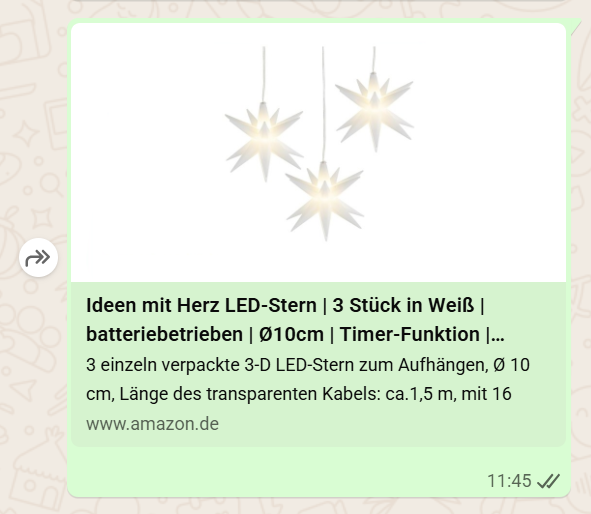
In the early days, Amazon links appeared in social networks mostly with the simple product image as a preview. This was fundamentally helpful – the product was visually presented – but it remained unused to incorporate additional information or incentives in the preview image. The presentation was often generic and offered no additional incentive beyond the product itself.
2. Preview Images with Star Ratings
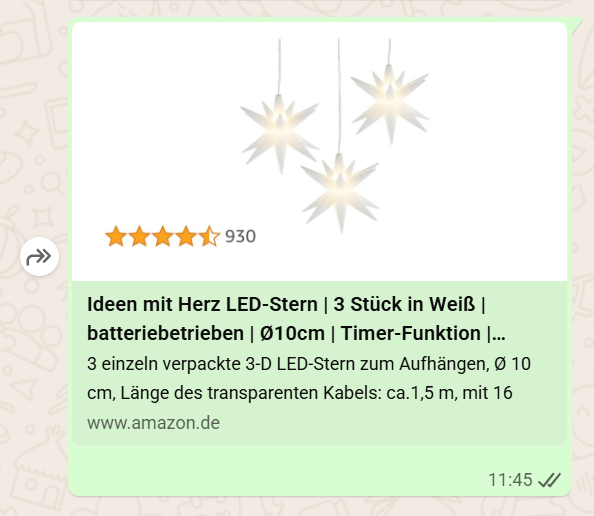
Amazon soon recognized the value of Social Proof directly in the link preview. Instead of using just a pure product photo, Amazon integrated customer reviews into the OG image – usually in the form of star ratings and possibly the number of reviews. A potential customer thus already sees in the shared link that the product has, for example, 4.5 out of 5 stars from hundreds of buyers. This trust advance significantly increases the click probability.
In fact, Amazon's own advertising data shows that creatives with customer reviews tend to achieve more interaction and page visits (1). A ⭐⭐⭐⭐⭐ rating visible in the link preview makes you curious and signals: "Others were convinced – maybe you too?"
3. Dynamic OG Images with Seasonal Accents
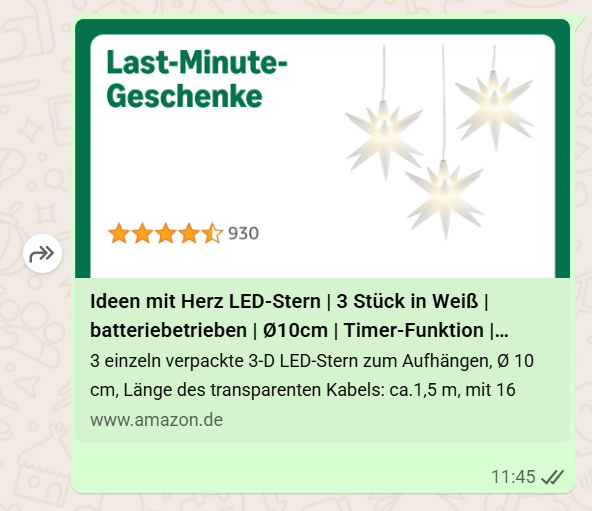
The latest stage of Amazon's link previews are dynamically generated preview images that are adapted contextually. This means that on certain occasions or seasons – such as Christmas, Black Friday, or "Back to School" – the preview image is automatically supplemented with thematic elements.
For example, in December, product previews might appear with a subtle Christmas background, snowflakes, or a note like "Holiday Deals". If you share a link in November, a "Black Friday" badge might be integrated. These dynamic contents ensure that the shared link appears current and relevant. The technology behind this are automatically generated OG images that can vary depending on the time or campaign (2). For Amazon, this pays off: users immediately recognize a current occasion (e.g., Christmas offers) and feel more addressed to click now before the offer passes.
Strategic Principles for Shop Owners
What do these observations mean concretely for your own online shop? Here are four central learnings from Amazon's approach – practical and directly implementable:
Use Social Proof Directly in the Preview Image
Show, if possible, ratings or other trust signals already in the link preview. An embedded ⭐⭐⭐⭐⭐ rating or a short note like "100+ positive reviews" in the OG image can win the trust of new customers even before they visit the page. Amazon shows how effective this can be – customer reviews demonstrably increase trust and click-through rates (1). Even if your shop (e.g., via Shopify plugins) doesn't offer automatic star display, you can consider manually integrating important awards or reviews into the preview image.
Make Seasonal and Contextual Adjustments
Plan your preview images like small advertising banners that pick up on current occasions. Is the Winter Sale coming up, Black Friday week, or a holiday promotion? Adapt your OG image accordingly – e.g., with a text like "%X% discount this week" or a subtle seasonal design element (Christmas motifs, Easter colors, etc.). This gives shared links a current hook and increases relevance. Modern technologies even make it possible to automatically serve such OG images depending on the season (2). But seasonal versions of your standard preview images can also be prepared manually and switched on time.
Clear, Appealing Design with Recognition Value
Amazon's preview images remain clear despite additional information – the product is the focus, supplemented by targeted one or two elements (e.g., stars, action badge). Avoid overloading. Rely on high-resolution images, well-readable overlays, and your brand colors/fonts. The preview image should catch the eye both on the smartphone display and on the desktop. Bright, high-contrast colors and a clear focus help your link stand out among all the other posts (3). At the same time, you strengthen your brand awareness if the logo or corporate design is recognizably integrated – just as Amazon, for example, often subtly incorporates its logo or typical color scheme.
Strategically Optimize Open Graph Tags (Including SEO Benefits)
Make sure your shop system supports Open Graph meta tags and that you set individual OG data for important pages (homepage, product pages, blog posts). In Shopify, for example, you can define a social sharing image for each product page or have OG images automatically generated via apps. Use this opportunity! An appealing preview image with a matching title and description leads to higher click numbers on shared links – and that ultimately brings more visitors.
More clicks and shared content in turn mean more traffic and potentially indirect SEO benefits, as increasing user numbers and engagement can positively affect your ranking in the long term (4). In short: Optimized link previews are not a direct Google ranking factor, but they bring more people to your page and search engines notice when your page is in demand.
Conclusion
Amazon's approach to link previews shows that the difference can lie in the details. Every shared product is a small advertisement in itself. While many shops leave the preview of their links to chance, Amazon has learned to deliberately design this moment – with trust (ratings), currency (seasonal actions), and solid design.
Online retailers of any size can benefit from these principles: Make your link previews eye-catching and informative. This increases the chance that a shared link becomes a click – and ultimately a new customer. By strategically improving your OG images, you invest in a more professional appearance of your shop and simultaneously create more traffic potential as well as a subtle SEO boost through higher user activity.
In a time when attention is hotly contested, it's worth not leaving these "small things" to chance either.
Sources
- (1) Amazon Ads - Responsive eCommerce creative Update (Dec. 15, 2021) – Customer reviews in advertising materials increase interactions and trust.
- (2) Balazs Barta: Dynamic OG images in Astro (Blog, 2025) – Dynamic Open Graph images enable, among other things, seasonal variations.
- (3) svaerm Blog - Social Media Preview with Open Graph Meta Tags – Tips for attention-grabbing OG images (contrast, focus, mobile-friendliness).
- (4) Unlocking the Power of Open Graph: Why It Matters for SEO and Sharing | by Lince Mathew | Medium (Sept. 2025) – Open Graph optimization brings more clicks, traffic, and indirectly better rankings.
(Reading time approx. 3-4 minutes)