
Ultimate Link Preview Guide 2025: Why it's more important than ever in e-commerce how your links look
 by Alex Swetlow, December 14, 2025 - updated December 16,
2025
by Alex Swetlow, December 14, 2025 - updated December 16,
2025How to avoid your links getting lost in WhatsApp, Facebook, and Co.: What many shop owners don't know: In private chats – the so-called Dark Social – an invisible code decides whether your link gets clicked or not. Here's what matters.
Imagine a potential customer sharing one of your product links in a WhatsApp chat with friends. What do the recipients see? Just a bare link with a cryptic URL – or an appealing preview with image, title, and description that immediately makes them want to click? In times when a large portion of recommendations happen in the shadows , appealing link previews become the secret tip for more traffic and sales. In this guide, you'll learn why link previews are more important than ever for your online shop in 2025, what Open Graph Tags are all about, and how you can make your links shine with just a few steps.
What is a Link Preview (and what does Open Graph have to do with it)?
When you share a link in social networks or messenger apps, a link preview is automatically generated. This small preview card usually contains a preview image, the page title, and a short description. It gives the recipient a first impression of the shared content – before they've even clicked.



Technically, this works through special HTML metadata, the so-called
Open Graph Tags
(originally developed by Facebook). The most important ones are:
og:title (for the title),
og:description (for the description), and
og:image
(for the preview image). These tags determine how your page is
displayed when someone shares the link.
Without correctly set Open Graph data, it can happen that when sharing, either no preview appears at all or, for example, a random image is pulled from your page. The result: an uninviting presentation. With the right tags, however, you control what appears – such as your product photo in optimal size, a catchy title, and a curiosity-inducing description. In short: Link previews are your shop's digital business card, everywhere links are shared.


Additionally: Social media platforms constantly change their presentation. Twitter (or X), for example, experimented with displaying link previews without titles – only with image and domain. This means your preview image becomes the only eye-catcher! The trend is clear: Without a striking preview image, you'll get lost.
“ ”These tags can have a huge effect on conversions and click‑through rates, because if they're set up incorrectly, inaccurate content will appear when pages are shared on social media.
Liam Griffin, June 28, 2017, https://www.shopify.com/partners/blog/open-graph-tags
Even Google has acknowledged that OG tags play an important role. Google's Search Advocate John Müller reminded us in 2023 that Open Graph Tags are essential for correctly displaying content on social media – and that they help get more traffic and engagement. While OG tags aren't a direct ranking factor for SEO, they indirectly improve your reach: Satisfied visitors who share your content attractively bring new people to your shop.
Dark Social: The invisible power behind your visitors
You might be wondering why all of this is such a big topic. The reason: An ever-growing portion of content is shared privately, i.e., outside of public platforms. Experts speak of "Dark Social" here – meaning traffic that comes from sources that are not directly visible in your web analytics (e.g., messengers, private chats, emails). And this hidden exchange is gigantic:
 Find more infographics at
Statista
Find more infographics at
StatistaWhy is this relevant for you as a shop owner? Because your products and links are probably constantly being shared in WhatsApp, Telegram & Co., without you noticing. No wonder: WhatsApp alone counts well over 2 billion active users worldwide – a huge potential stage for your products. Private messengers and groups sometimes even have more active users than public social networks. This development means: Your brand is often experienced for the first time in a private chat. And at exactly this touchpoint, it's decided whether the recipient becomes curious about your shop or not.
“ ”In the past, a study by Radium One showed that three quarters of all shares of web content are private shares . These personal recommendations in private environments create particularly high relevance and credibility.
Jessica Lumme, May 10, 2024, https://www.heise-regioconcept.de/social-media/dark-social/
The tricky thing about Dark Social: In your analytics tools, these
visitors usually only appear as "Direct" traffic, since the
actual source remains hidden. So you hardly see the impact of these
shared links directly in Facebook likes or referral reports. Many
marketers therefore underestimate the influence.
Conclusion:
Even if you don't see the shares, they happen – and they're
incredibly important. Reason enough to polish your link presentation
to perfection for these "invisible" channels!
Why are appealing Link Previews so important?
You probably already suspect it: How your link looks when it's shared can make the decisive difference. Here are the most important reasons why you should focus on beautiful link previews – backed by facts:
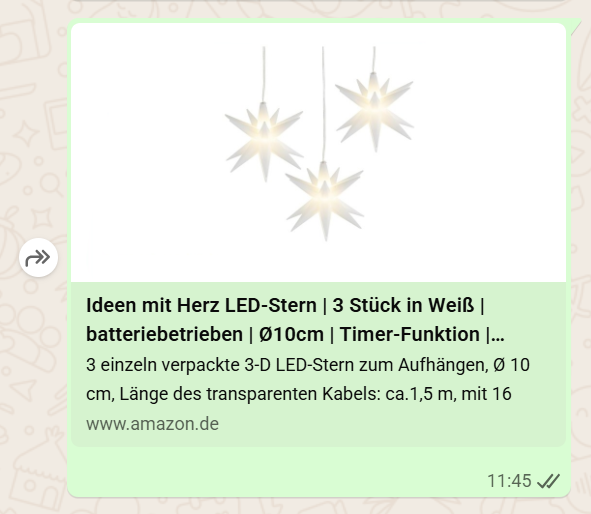
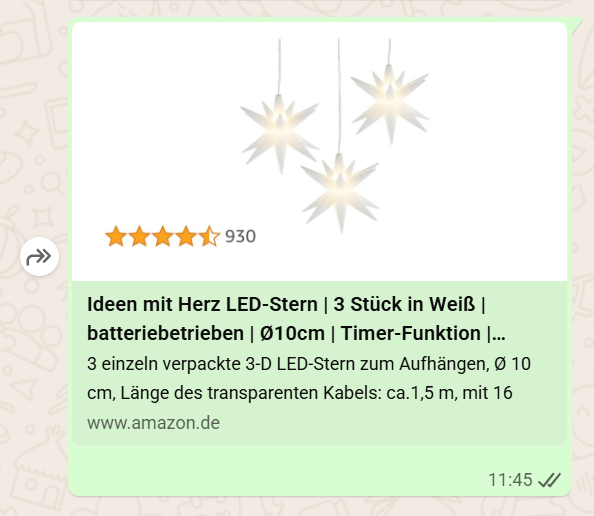
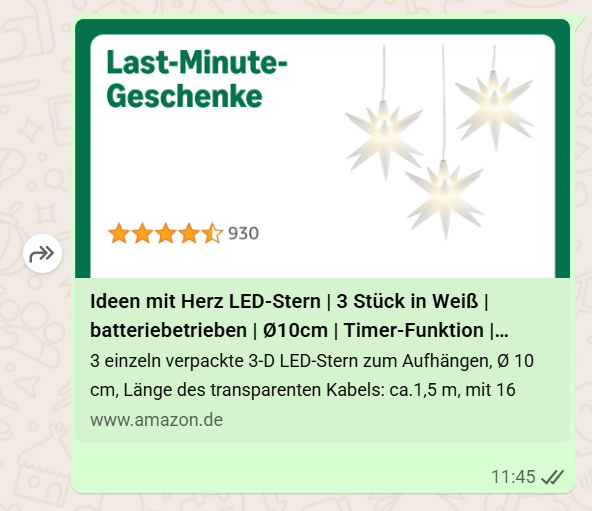
A look at Amazon's development impressively demonstrates the potential of optimized link previews: The e-commerce giant has continuously improved its preview images over the years – from simple product photos to images with integrated star ratings to dynamic, seasonally adapted graphics. This evolution proves that Amazon recognized the importance of social proof, timeliness, and professional design in link previews early on. Shop owners can learn from these strategies and specifically optimize their own OG images to build more trust and increase click rates. A detailed analysis of Amazon's approach and concrete implementation tips can be found in our article "What Online Shops Can Learn from Amazon's Approach to Link Previews".
More Clicks & Engagement
An image-rich, attractive preview catches the eye and encourages clicking. Studies show that posts with optimized preview images achieve significantly higher interaction rates – one analysis found, for example, 179% more engagement compared to links without an appealing image . In A/B tests, by strategically replacing the Open Graph image, the click rate could be increased by 47% . In short: A good link preview is a real click turbo!
Trust & Professionalism
A cleanly formatted link with a preview image immediately conveys a professional impression. Users infer the trustworthiness of the site from the preview image. Consistent, high-quality OG images strengthen your brand identity and build trust . A shop that shows a high-quality product photo and clear info in the preview appears more trustworthy than one that only appears with a bare URL. Conversely, a missing image or messy preview can even arouse suspicion ("Where does this link lead?"). Your link preview is also a question of brand perception.
More Shares & Reach
Attractive link previews are shared and liked more often . Users react more to links with images and like to forward them to others. Conversely: If your link looks inconspicuous, it not only gets lost – it's also recommended less often. With appealing previews, you can promote viral spread among friends. Also, content with more interactions tends to get more visibility (e.g., in social feeds). A successful preview thus indirectly increases your reach.
Competitive Advantage
Surprisingly, many online retailers still neglect this topic. Even well-known companies often haven't set optimized Open Graph tags on their website – and thus waste valuable traffic. For you, this means: Being early pays off. If your links are optimally presented and your competitors' aren't, you have a clear advantage. You appear more innovative and customer-oriented, simply because you pay attention to details that immediately catch the eye. This small extra mile can ultimately make the difference in clicking your shop link instead of your competitor's.
Tips: How to get perfect Link Previews for your shop
Enough theory – how do you implement this practically? The good news: You don't have to be a programmer to ensure appealing link previews. Here are some practical tips, especially for Shopify shop owners:
Use Open Graph Tags
Make sure your website delivers Open Graph data. With common shop platforms, this is often already integrated. Shopify shops , for example, use product photos, titles, and descriptions as previews by default, if available help.shopify.com . For pages without product images (e.g., homepage, "About us"), you can set a default preview image in the Shopify admin under Online Store > Settings > "Social Sharing Image". Use this option! Choose a meaningful image (e.g., your logo or a collage of your bestsellers) that will be shown if no specific graphic is available.
Choose high-quality, appropriate images
The og:image is the star of your link preview. Therefore, pay attention to quality and format. Landscape images in 1200 × 630 pixels (aspect ratio approx. 1.91:1) are ideal, as this dimension is recommended by Facebook & Co. and prevents cropped displays. Use sharp, bright images that best represent your product or brand. A lifestyle shot of your product can, for example, make people more curious than just a packshot on a white background. Avoid text-heavy graphics – in the small preview, few, clear elements are more effective.
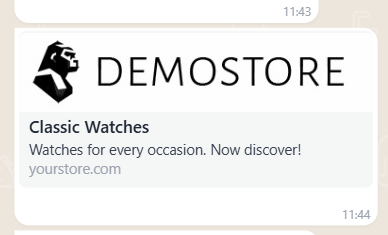
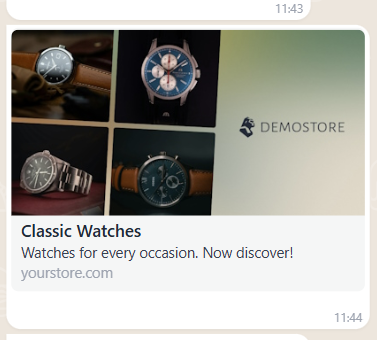
Choose images with context instead of a generic logo (left), such as
that the link leads to a collection (right).
When a link's preview in social media honestly reflects the actual
content of the page, users are less often disappointed or irritated
–
they stay on the page longer instead of immediately bouncing . This can positively affect your visibility in search engines, as
the bounce rate may flow into the ranking.
Pro tip: If your shop system doesn't automatically set the right
image per product page, it's worth using a plugin or tool that lets
you define an individual preview image for each page.
Optimize title and description
In addition to the image, the title (og:title) and description (og:description) should also be correct. These texts are displayed in the preview. Formulate the title concisely and interestingly – e.g., instead of "Product XY – now in shop" rather "Product XY – [Benefit/Highlight] for you". The description can be a short teaser that makes you want more (such as a USP, offer, or question). Keep it short (one to two sentences), as many messengers don't display more. And don't worry: In Shopify, you can often edit these texts in the SEO section of the respective page (they usually take the meta description as the preview text).
Test your preview
Before you send everything out into the world, test your link preview. There are free tools for this. Facebook, for example, offers the Sharing Debugger , with which you can see how your link will look on Facebook (and which also allows updating new images if Facebook still has an old version in cache). Similar checkers exist for LinkedIn . This way, you ensure that image and text are displayed as desired. If you discover errors (e.g., wrong image, cut-off text), you can correct them before the big share.
Stay up-to-date
The social media landscape is constantly evolving. In 2025, platforms like Instagram and WhatsApp are experimenting with new features (such as broadcast channels or community chats) that bring brands even more directly into private feeds. Therefore, make sure you keep an eye on the presentation of your links with new trends as well. Sometimes requirements also change (e.g., optimal image sizes or new fields like og:price for product price). An occasional check or a look at the Shopify documentation can't hurt. But don't worry: The basics – a great image, good title, clean tags – will likely continue to pay off.
Conclusion: Small preview, big effect
Link previews are more important than ever in e-commerce in 2025, because they shine exactly where classic advertising doesn't reach: in the shadows of private chats and direct messages. While everyone is vying for likes and followers on public platforms, a large portion of purchase recommendations happens behind the scenes – invisible but powerful. When your shop link is shared in such a moment, split seconds decide between interest or ignoring. An appealing preview image with catchy text can make the difference between a new visitor (and potential buyer) and an overlooked link.
The good news: You have it in your own hands. With a few adjustments – often directly in your shop backend – you ensure that your links appear as real eye-catchers. Given the statistics, it's clear that enormous potential lies dormant here. It's like setting up free mini-billboards in millions of chats – why pass that up?
So, take the time and get your link previews in order. Your visitors will thank you subconsciously, and so will your click numbers. In competitive online retail, every detail counts – and such a perfect link preview is a relatively simple lever with great effect. Good luck trying it out and happy sharing! 🚀